
GiMeSpace QuickMenu2.1.0.33 - Download
You'll be able to download in few seconds.
Publisher Description
While ms is annoying windows desktop users with metro/modernUI, and other companies are restoring things back to the old, GiMeSpace is offering desktop users something much better: the most simple and fastest task launcher possible! GiMeSpace QuickMenu!
Press a custom assigned mouse/keyboard key, the menu pops up at the place of the mouse cursor, move to the desired task, release the key, and that is all! Can not be quicker or easier!
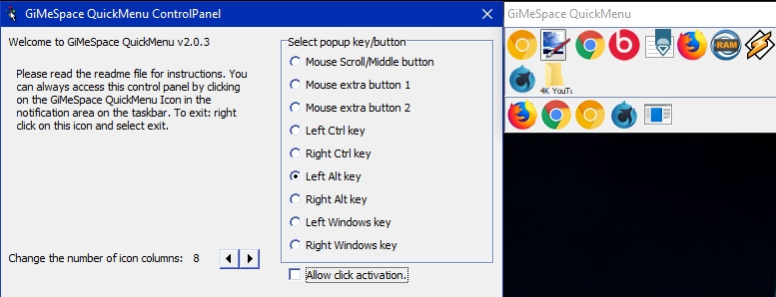
In the control panel you can select the 'hotkey' that you like to use to make the QuickMenu show up. If you rather like one click to make the menu show up and then an other click to select the desired task then you can select 'allow click activation'. You can also adjust the number of icon columns that the menu will show.
The QuickMenu has two parts, the upper part shows the running tasks with the tasks you used last, first (like with alt-tab). In the bottom part you can add any item you want (programs, files, shortcuts, etc).
While the QuickMenu control panel is shown, you can drag items to the lower part of the QuickMenu and order them in your desired order. You can remove items by right clicking on them. When you add all your favourite programs, you will notice you will hardly ever use the normal startmenu again.
When you are done with the Control panel, click the close button and you are ready for a more easy and efficient desktop experience:
Simply press your chosen hotkey, the menu shows at the mouse cursor position, move the cursor to the task of your choice and release, the task will show or launch!
When the mouse cursor is not too close to the screen border the QuickMenu will show in the position so that the task you used last (before the current one) will show right under the cursor. This way, switching between 2 tasks becomes very easy, you just press the hotkey and release it again, and that is all that is needed to switch to the last task!
About GiMeSpace QuickMenu
This Launchers & Task Managers program is available in English. It was last updated on 29 September, 2026. GiMeSpace QuickMenu is compatible with the following operating systems: Windows.
The company that develops GiMeSpace QuickMenu is GiMeSpace. The latest version released by its developer is 2.1.0.33.
The download we have available for GiMeSpace QuickMenu has a file size of N/A. Just click the green Download button above to start the downloading process. The program is listed on our website since 2022-09-09 and was downloaded 0 times. We have already checked if the download link is safe, however for your own protection we recommend that you scan the downloaded software with your antivirus. Your antivirus may detect the GiMeSpace QuickMenu as malware if the download link is broken.
How to install GiMeSpace QuickMenu on your Windows device:
- Click on the Download button on our website. This will start the download from the website of the developer.
- Once the GiMeSpace QuickMenu is downloaded click on it to start the setup process (assuming you are on a desktop computer).
- When the installation is finished you should be able to see and run the program.
Program Details
System requirements
Download information
Pricing
Version History
version 2.1.0.33
posted on 2022-09-09
Supports now unicode systems
version 2.0.6.28
posted on 2020-11-11
Optimized for higher resolution monitors.
version 2.0.3.18
posted on 2018-07-28
Now free to use by anyone commercial or personal.
version 2.0.1.13
posted on 2015-04-04
Minor bug fixes
version 1.0.1.7
posted on 2013-09-22
New release
Disclaimer
External Download
We do not host GiMeSpace QuickMenu on our servers. We did not scan it for viruses, adware, spyware or other type of malware. This app is hosted by the software publisher and passed their terms and conditions to be listed there. We recommend caution when installing it.
The external download link for GiMeSpace QuickMenu is provided to you by apps112.com without any warranties, representations or guarantees of any kind, so access it at your own risk.
If you have questions regarding this particular app contact the publisher directly. For questions about the functionalities of apps112.com contact us.
